Create a wedding RSVP QR code for your invitations
Create your wedding RSVP page, download your QR code and let guests respond straight from their phone. Collect attendance, meal choices and dietary requirements in one place.
Free to get started. No guest accounts or app downloads.
How does a wedding RSVP QR code work?
A wedding RSVP QR code is a scannable code that links directly to your online RSVP page. Add it to your wedding invitations and guests can scan it with their phone camera to respond.
Instead of waiting for paper reply cards, responses are collected online and added to your guest list automatically. You can also ask guests for meal selections, dietary requirements and other information at the same time.
Everything you need for QR code wedding RSVPs
Keep the invitation simple for your guests and the admin simple for you.
QR code generated for you
Create your RSVP page and get a ready-to-download QR code linked directly to it.
Simple for guests
Guests scan the code with their phone and can respond without downloading an app or creating an account.
Collect meal choices
Ask guests to choose their meals and add any dietary requirements or other notes as part of their RSVP.
Learn moreTrack responses in one place
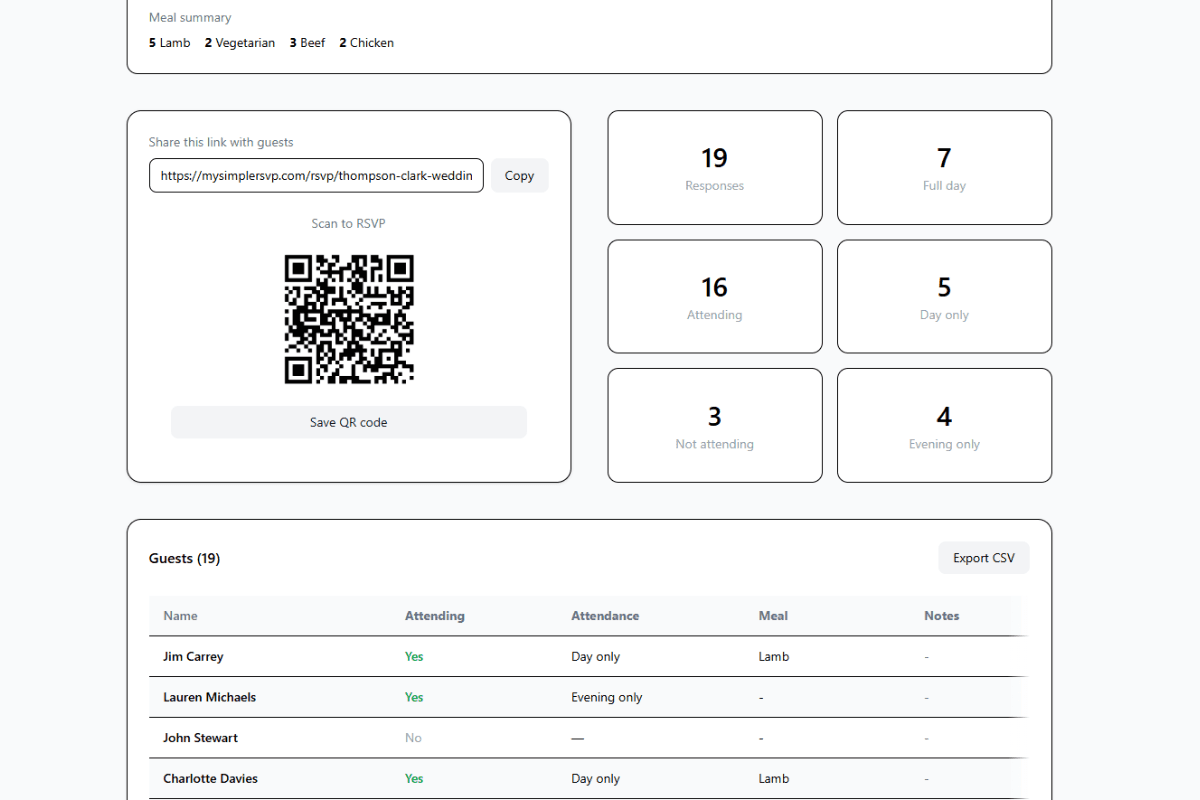
See submitted responses, including who is attending and who has declined.
How to create a QR code for your wedding RSVP
You can have your RSVP page and QR code ready in just a few minutes.
Create your RSVP page
Add your wedding details, a custom message, meal options and RSVP deadline.
Download your QR code
MySimpleRSVP automatically creates a QR code linked directly to your RSVP page.
Add it to your invitations
Place the QR code on your main invitation, RSVP card or wedding information card.
Guests scan and respond
Guests open your RSVP page from their phone and submit their response in seconds.
More than just a QR code
Manage your wedding RSVPs in one place
Your QR code takes guests to a simple RSVP page designed to collect the information you actually need for your wedding.
- Track attending and declined guests
- Collect meal choices
- Note dietary requirements
- Manage day and evening attendance
- Collect guest notes and custom responses
- Export your guest list
Where should you put the QR code on your wedding invitation?
The code should be easy to find without taking over the design. Popular placements include:
- At the bottom of your main wedding invitation
- On a separate RSVP card
- On the back of the invitation
- On a wedding details or information card
We recommend printing a test copy and scanning the QR code from several phones before placing your final stationery order.
For more detailed advice on sizing, placement and invitation wording, read our guide to QR codes on wedding invitations.
What should you write next to your wedding RSVP QR code?
Keep the wording simple and make your RSVP deadline clear.
Wedding RSVP QR code FAQs
How do I create a QR code for my wedding RSVP?
Create your RSVP page with MySimpleRSVP and a QR code is generated automatically. Download the code and add it to your wedding invitation design before printing.
Can guests RSVP by scanning a QR code?
Yes. Guests simply scan the QR code using their phone camera. It opens your RSVP page where they can confirm attendance, choose their meals and add any notes you need from them.
Do guests need to download an app?
No. Your RSVP page opens in the guest's web browser, so there is nothing to download and no guest account is required.
Can I collect meal choices using a wedding RSVP QR code?
Yes. Guests can choose from your meal options, including multiple courses, and add dietary requirements or other notes when they RSVP.
Where should I put the QR code on my wedding invitation?
Common options include the bottom of the main invitation, a separate RSVP card, the back of the invitation or a wedding information card. Make sure the code is easy to find and has enough clear space around it.
What size should a wedding invitation QR code be?
Around 3cm by 3cm is a sensible size for most printed invitations. Avoid making it too small and always print and scan a test copy before placing your final stationery order.
Should I include a website address as well as the QR code?
It is a good idea. A short RSVP link gives guests another way to respond if they prefer not to scan the QR code.
Create your wedding RSVP QR code
Set up your RSVP page, download your QR code and start collecting guest responses online.
Create your RSVP pageFree to get started.